Building a Local AI Chess Coach With Stockfish, Gemma, and Lessy
I’ve been off on a brand-new tangent lately, obsessing over trying to actually improve my chess skills.
To give you a bit of backstory: I’ve been playing chess on and off for a long time, all the way back to before I was even a teenager. I vividly remember playing against my Grandpa, a man I was never able to beat. Chess was one of his deep passions, and I still cherish the times he took me to a tiny local chess club that I believe he and my uncle started with some friends.
I was never a chess master by any stretch, but I picked up a few things along the way. Like most people, I memorized a couple of opening traps, learned how to think a few moves ahead, and figured out how to strategize on the fly.
Since I’ve been experimenting a ton with local Ollama setups and running Gemma inference right on my own hardware, I figured it’d be a fun experiment: how well can a locally run 12B parameter model actually handle being a chess coach?
I started pretty simple by hacking together a Python CLI tool that wraps the Stockfish engine.
▶ chess-cli --help
Usage: chess-cli [OPTIONS] COMMAND [ARGS]...

  Chess Engine CLI utility for evaluation and LLM pipelines.

Options:
  --stockfish TEXT  Path to Stockfish binary.
  --help            Show this message and exit.

Commands:
  evaluate         Exhaustively evaluate and score EVERY legal move in...
  evaluate-move    Evaluate a specific move from input data quickly (2...
  get-score        Get the score and game state dossier with fully...
  play             Have the engine play the best move for the given...
  predict          Predict top candidate moves in a position using...
  review           Review a game chronologically.
  visualize-board  Render the board state and position details.
Let’s start simple by looking at the evaluate-move subcommand:
▶ chess-cli evaluate-move --help
Usage: chess-cli evaluate-move [OPTIONS] INPUT_DATA MOVE

  Evaluate a specific move from input data quickly (2 searches instead of all
  legal moves).

Options:
  --depth INTEGER  Search depth.
  --skill INTEGER  Stockfish skill level (0 to 20).
  --elo INTEGER    Stockfish target Elo rating.
  --llm            Output plain text formatted for LLM consumption.
  --help           Show this message and exit.
This command takes the current move history and evaluates a specific next move. For example, say we have a board state where White plays e4, Black responds with e5, and I want to see how a move like Nf3 holds up:
▶ chess-cli evaluate-move "e4 e5" "Nf3"
{
  "evaluate_move": "Nf3",
  "engine_best_move": "Nf3",
  "was_best_move": true,
  "resulting_evaluation": "White is ahead by 0.29 pawns (29 CP)",
  "cp_loss": 11,
  "quality": "Accurate / Solid",
  "continuation": "Nf6 -> Nxe5 -> d6 -> Nf3 -> Nxe4 -> d4 -> d5 -> Bd3 -> Bb4+ -> c3 -> Bd6 -> O-O -> O-O -> c4 -> c6 -> Nc3 -> Nxc3 -> bxc3 -> dxc4 -> Bxc4 -> Bf5 -> Re1 -> Nd7 -> Bg5",
  "resulting_fen": "rnbqkbnr/pppp1ppp/8/4p3/4P3/5N2/PPPP1PPP/RNBQKB1R b KQkq - 1 2"
}
Stockfish instantly tells us whether our choice matched its top recommendation, assigns it a quality rating (like “Accurate / Solid”), calculates the centipawn loss, and even maps out a predicted continuation line.
To make life easier for an LLM parsing these results, passing the --llm flag strips away the raw JSON structure and formats everything into a clean, text-based dossier:
▶ chess-cli evaluate-move "e4 e5" "Nf3" --llm
[MOVE EVALUATION RESULT]
- Move: Nf3 (g1f3)
- Engine Best Move: Nf3 (g1f3)
- Was Best Move: Yes
- Move Cost: 11 CP
- Quality: Accurate / Solid
- Continuation: Nf6 -> Nxe5 -> d6 -> Nf3 -> Nxe4 -> d4 -> d5 -> Bd3 -> Bb4+ -> c3 -> Bd6 -> O-O -> O-O -> c4 -> c6 -> Nc3 -> Nxc3 -> bxc3 -> dxc4 -> Bxc4 -> Bf5 -> Re1 -> Nd7 -> Bg5
- Resulting FEN: rnbqkbnr/pppp1ppp/8/4p3/4P3/5N2/PPPP1PPP/RNBQKB1R b KQkq - 1 2
We also have the evaluate subcommand, which takes things a step further by exhaustively evaluating and scoring every single legal move in the current position:
▶ chess-cli evaluate --help
Usage: chess-cli evaluate [OPTIONS] INPUT_DATA

  Exhaustively evaluate and score EVERY legal move in the current position
  (comprehensive audit).

Options:
  --depth INTEGER  Search depth.
  --skill INTEGER  Stockfish skill level (0 to 20).
  --elo INTEGER    Stockfish target Elo rating.
  --llm            Output plain text formatted for LLM consumption.
  --help           Show this message and exit.
If we use that same setup of 1. e4 e5 and pass the –llm flag, we get a full breakdown of what White’s best options look like:
▶ chess-cli evaluate "e4 e5" --llm
[ALL LEGAL MOVES PREDICTED & CLASSIFIED]
  - [White] Move: Nf3 (g1f3)     | Quality: Best Move / Brilliant      | Move Cost: 0 CP
  - [White] Move: Nc3 (b1c3)     | Quality: Subtle Inaccuracy          | Move Cost: 17 CP
  - [White] Move: Be2 (f1e2)     | Quality: Subtle Inaccuracy          | Move Cost: 39 CP
  - [White] Move: d4 (d2d4)      | Quality: Subtle Inaccuracy          | Move Cost: 41 CP
  - [White] Move: Bc4 (f1c4)     | Quality: Subtle Inaccuracy          | Move Cost: 42 CP
  - [White] Move: a4 (a2a4)      | Quality: Subtle Inaccuracy          | Move Cost: 43 CP
  - [White] Move: Ne2 (g1e2)     | Quality: Subtle Inaccuracy          | Move Cost: 45 CP
  - [White] Move: h3 (h2h3)      | Quality: Subtle Inaccuracy          | Move Cost: 46 CP
  - [White] Move: d3 (d2d3)      | Quality: Subtle Inaccuracy          | Move Cost: 48 CP
  - [White] Move: a3 (a2a3)      | Quality: Subtle Inaccuracy          | Move Cost: 49 CP
  - [White] Move: Bb5 (f1b5)     | Quality: Inaccuracy                 | Move Cost: 52 CP
  - [White] Move: c3 (c2c3)      | Quality: Inaccuracy                 | Move Cost: 54 CP
  - [White] Move: Qh5 (d1h5)     | Quality: Inaccuracy                 | Move Cost: 58 CP
  - [White] Move: Bd3 (f1d3)     | Quality: Inaccuracy                 | Move Cost: 59 CP
  - [White] Move: Qf3 (d1f3)     | Quality: Inaccuracy                 | Move Cost: 59 CP
  - [White] Move: f4 (f2f4)      | Quality: Inaccuracy                 | Move Cost: 62 CP
  - [White] Move: Qe2 (d1e2)     | Quality: Inaccuracy                 | Move Cost: 75 CP
  - [White] Move: h4 (h2h4)      | Quality: Inaccuracy                 | Move Cost: 80 CP
  - [White] Move: c4 (c2c4)      | Quality: Inaccuracy                 | Move Cost: 87 CP
  - [White] Move: g3 (g2g3)      | Quality: Inaccuracy                 | Move Cost: 89 CP
  - [White] Move: b3 (b2b3)      | Quality: Inaccuracy                 | Move Cost: 98 CP
  - [White] Move: Na3 (b1a3)     | Quality: Mistake                    | Move Cost: 108 CP
  - [White] Move: f3 (f2f3)      | Quality: Mistake                    | Move Cost: 118 CP
  - [White] Move: Nh3 (g1h3)     | Quality: Mistake                    | Move Cost: 124 CP
  - [White] Move: Qg4 (d1g4)     | Quality: Mistake                    | Move Cost: 149 CP
  - [White] Move: Ke2 (e1e2)     | Quality: Mistake                    | Move Cost: 153 CP
  - [White] Move: b4 (b2b4)      | Quality: Mistake                    | Move Cost: 168 CP
  - [White] Move: g4 (g2g4)      | Quality: Mistake                    | Move Cost: 199 CP
  - [White] Move: Ba6 (f1a6)     | Quality: BLUNDER                    | Move Cost: 759 CP
And finally, let’s look at a true BLUNDER where White puts its Queen straight into harm’s way. The review subcommand sequentially evaluates each move in a game sequence, which is what gives our LLM the raw material to break down a match move-by-move, or at least, that’s the hope:
▶ chess-cli review "d4 e6 Qd3 Nc6 Qa3" --llm
[POSITION EVALUATION DOSSIER]
- FEN: r1bqkbnr/pppp1ppp/2n1p3/8/3P4/Q7/PPP1PPPP/RNB1KBNR b KQkq - 3 3
- Active Turn: Black
- Game Status: Active (In Progress)
- Evaluation: Black is winning by 8.59 pawns (859 CP)

[CHRONOLOGICAL GAME REVIEW]
     1. [White] Move: d4 (d2d4)      | Quality: Accurate / Solid               | Eval: +0.23 (White +0.23)      | Move Cost: 6 CP
     1. [Black] Move: e6 (e7e6)      | Quality: Subtle Inaccuracy              | Eval: +0.38 (White +0.38)      | Move Cost: 17 CP
     2. [White] Move: Qd3 (d1d3)     | Quality: Inaccuracy                     | Eval: 0.00 (Equal)             | Move Cost: 54 CP
     2. [Black] Move: Nc6 (b8c6)     | Quality: Inaccuracy                     | Eval: +0.28 (White +0.28)      | Move Cost: 51 CP
     3. [White] Move: Qa3 (d3a3)     | Quality: BLUNDER                        | Eval: -8.59 (Black +8.59)      | Move Cost: 882 CP
From this blunder, an ideal player should immediately capitalize by capturing the hanging Queen with their Bishop. That is precisely what the predict subcommand surfaces for us:
▶ chess-cli predict "d4 e6 Qd3 Nc6 Qa3" --llm
[ENGINE TOP CANDIDATE MOVES]
  1. Move: Bxa3 (f8a3) | Eval: -8.99 (Black +8.99) | Move Cost: 0 CP | Quality: Best Move / Brilliant | Continuation: Bxa3 -> Nxa3 -> Nxd4 -> c3 -> Nc6 -> Nf3 -> h6 -> Bf4 -> d6 -> Bg3 -> b6 -> Nh4
  2. Move: Bb4+ (f8b4) | Eval: -8.32 (Black +8.32) | Move Cost: 67 CP | Quality: Inaccuracy | Continuation: Bb4+ -> Qxb4 -> Nxb4 -> Na3 -> Nc6 -> Nf3 -> Nxd4 -> Nxd4 -> d6 -> Nc4 -> e5 -> Nf3 -> Bg4
  3. Move: Nxd4 (c6d4) | Eval: -2.27 (Black +2.27) | Move Cost: 672 CP | Quality: Inaccuracy (Maintains Win) | Continuation: Nxd4 -> Qd3 -> Nc6 -> Nc3 -> Nf6 -> Nf3 -> Bc5 -> Bf4
All that was left was to wire these CLI outputs into a proper framework, and I’ve already put that into practice using Lessy, which you can read more about in my post on building context-aware agentic harnesses.
Once exposed to gemma4:12b alongside a focused system prompt, we can finally test whether a local model can hold an intelligent, live conversation about a game without losing its mind. Here is the exact system prompt driving the coach:
system_prompt: |
  You are a warm, elite grandmaster chess coach providing live voice feedback. Your goal is to guide the player using short, natural sentences optimized for text-to-speech.

  RULES:
  1. Rely strictly on the provided engine review data. Never invent scores, blunders, or tactical threats.
  2. Translate centipawn scores into intuitive concepts (balanced, slight edge, or major turning point) without saying raw numbers like "-859 CP".
  3. Keep responses strictly between 2 to 3 spoken sentences. Be punchy and conversational.
  4. Wrap all chess moves and squares in single backticks (e.g., `e4`, `c5`, `Qa3`).
  5. Never use markdown headers (`#`, `##`, `###`).

  EXAMPLES:
  User: Give me coaching advice.
  Coach: You've made a strong start by playing `e4` to claim space in the center. Your opponent responded accurately with `c5`, leading you right into a rich and complex Sicilian Defense.
When we fire up the harness and kick off the session, the user query drops right into the agent loop:
Hey coach, I'm playing the white pieces, can you review my game so far:

"d4 e6 Qd3 Nc6 Qa3"
One of the coolest parts to watch is the model’s inner monologue as it parses the board state, identifies who played what, and decides which CLI tool to call before offering feedback:
Thinking: *   User is White.
    *   Move sequence provided: d4 e6 Qd3 Nc6 Qa3.
    *   Goal: Review the game using a warm, elite grandmaster persona for TTS (short sentences, 2-3 per response).

    1.  d4: Standard opening move.
    2.  e6: French Defense or standard preparation.
    3.  Qd3: Early queen development is slightly unusual but playable in some lines; however, it blocks the light-squared bishop (if white intended to play a Queen's Gambit style).
    4.  Nc6: Standard developing move for Black.
    5.  Qa3: This is an unconventional and risky move. It puts the queen on a square where it can be harassed or ignored, but more importantly, Qd3 followed by Qa3 suggests White is trying to
        create pressure/threats early while neglecting piece development (the light-squared bishop).

    *   Call chess_review(source="d4 e6 Qd3 Nc6 Qa3").
And of course, what we really care about is the LLM’s final response, which, thanks to Lessy keeping it grounded in real engine data, hits all the right notes:
You’ve started with a solid d4 and Qd3, but your move to Qa3 is a major turning point that puts you in a very difficult position. By moving the queen so early, you’ve allowed Black to gain a massive advantage because it leaves your pieces out of play. I recommend focusing on developing your minor pieces first before bringing your queen into the action.
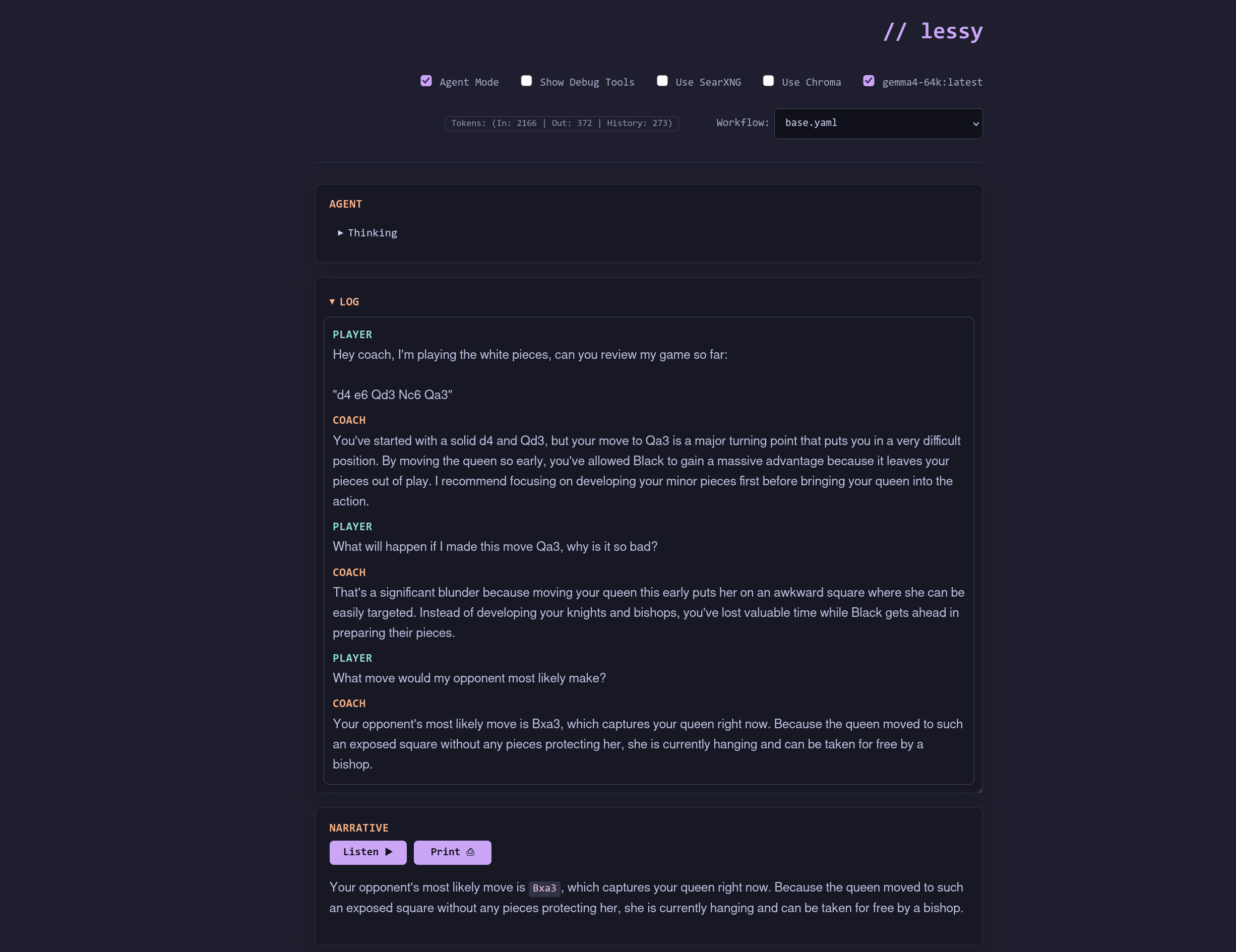
And here’s what the view from Lessy actually looks like in action if we were to continue the conversation:
Turns out you don’t need a cloud cluster to build a decent chess coach, just a bit of Python, a relentless open-source engine, and a local 12B model that’s trying its best. Now, back to studying opening theory before my AI assistant starts roasting me.